

Why this feature matters
In many terminals, moving a stop to breakeven is a manual process. A trader has to calculate the correct level, account for execution details, and then place or modify a stop-loss order by hand. Entry Finance simplifies that flow into a dedicated action. That matters because breakeven is often used at the exact moment when a trade starts working and the trader wants to reduce risk quickly. A one-click flow is faster, easier, and less error-prone than recalculating the stop manually every time.How breakeven works
When you use breakeven, Entry Finance creates a stop-loss order at the breakeven price for that position. This is useful when:- the trade has already moved far enough in your favor
- you want to protect the position from turning into a loss
- you want to remove the need to manually move the stop
What breakeven means in practice
Breakeven means the position is protected around the entry level instead of being left with the original stop placement. In practical terms, that means:- if price continues moving in your favor, the trade stays open
- if price reverses back toward entry, the stop is already positioned to get you out around breakeven
How to place a breakeven order
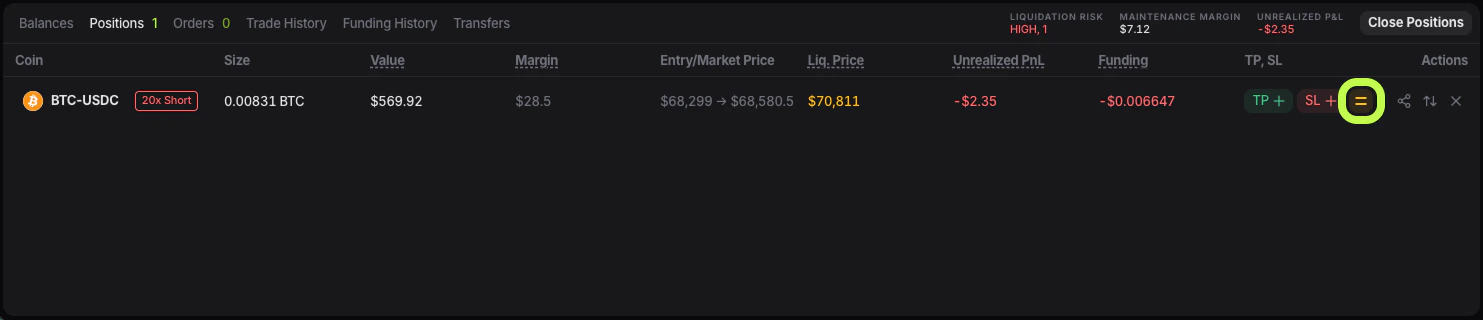
- Open the Positions tab.
- Find the position you want to protect.
- Open the action that leads to Breakeven position.
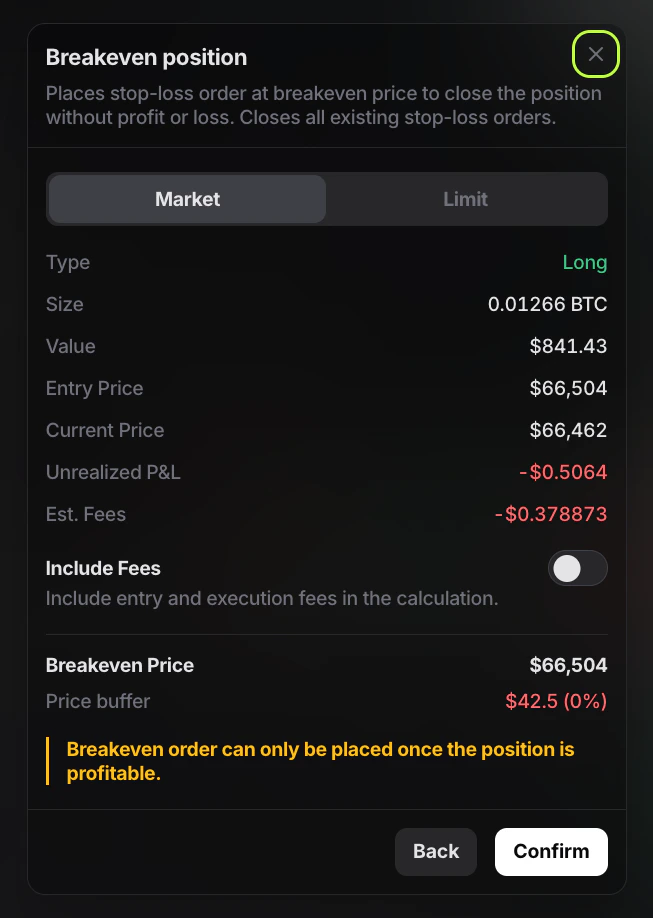
- In the Breakeven position window, choose Market or Limit.
- Check the position details shown in the window.
- Decide whether to enable Include Fees.
- Review the displayed
Breakeven Price. - Confirm the order.
What the breakeven window shows
In the current Entry Finance interface, the Breakeven position window shows:- Market or Limit - this controls how the breakeven stop will execute after it is triggered.
- Position type - this shows whether the current position is Long or Short. That matters because the breakeven logic is applied differently depending on the trade direction.
- Size - this is the size of the position the breakeven order will protect.
- Value - this is the notional value of the position.
- Entry price - this is the price where the position was opened. It is the starting point for the breakeven calculation.
- Current price - this is the live market price when you open the breakeven window. It helps you see how far the market has already moved away from your entry.
- Unrealized P&L - this is the current profit or loss on the open position. Because the breakeven action is only available once the position is profitable, this number is especially important when deciding whether the position has moved far enough to justify moving the stop.
- Estimated fees - this shows the estimated fees relevant to the breakeven calculation.
- Include Fees - this tells Entry Finance to include entry and execution fees in the breakeven calculation, so the stop is placed at a level that aims to cover trading costs as well.
- Breakeven Price - this is the price Entry Finance calculates for the new stop-loss placement. It is the key output of the feature.
- Price buffer - this shows the distance between the current market price and the breakeven stop.
What Include Fees does
If Include Fees is enabled, Entry Finance includes entry and execution fees in the breakeven calculation. This means the stop is placed at a level that aims to cover fees as well, not just match the raw entry price. If Include Fees is disabled, the breakeven level is based more directly on the entry price itself. This is especially useful for short-term trading, where fees can make a visible difference to the real result. Without fee adjustment, a stop placed exactly at the entry price may still leave a small net loss after execution costs. With Include Fees enabled, Entry Finance adjusts the breakeven level to better reflect the real all-in result.When breakeven is available
The current Entry Finance interface shows an important rule:Breakeven order can only be placed once the position is profitable.
If the position is not yet in profit, the breakeven action will not be available in a usable way. This makes sense because a breakeven stop is meant to protect gains or remove downside after the trade has already moved in your favor.
When it makes sense to use breakeven
Breakeven is most useful when:- the position has already moved enough in your favor to justify reducing risk
- you no longer want to leave the original stop-loss in place
- the trade has reached a point where protecting capital matters more than giving the setup maximum room
- a strong impulse move
- a clean breakout
- a reaction from a planned entry zone
What happens to your previous stop-loss
When you place a breakeven order, Entry closes all existing stop-loss orders for that position and replaces them with the new breakeven stop. This is important because the terminal keeps one active stop-loss logic for the position instead of stacking multiple conflicting stops on top of each other. So before confirming breakeven, it is worth understanding that you are replacing the old stop structure with a new one.How to check that breakeven is active
After confirming the action:- Go back to the Positions tab.
- Check the TP / SL area for that position.
- Open the Orders tab if you want to see the active stop order waiting in the market.